

How to blur sensitive details in a Windows screenshot
Also available in:简体中文
Support tickets, error screenshots and chat logs often carry more than you meant to share: email addresses, card numbers, server IPs, even API keys pasted into a terminal. Once an image is sent you cannot take it back, so redact first, then send. Here are two ways to do it on Windows.
Option 1: Mosaic or blur by hand (free)
- Press Ctrl+Shift+A (the default hotkey, which you can change in Settings) and drag to select the area.
- In the toolbar next to the selection, pick Mosaic (M) or Blur (B) and drag over the text you want to hide.
- Increase the grain (mosaic) or strength (blur) until the text is unreadable.
- Press Enter or double-click the selection to finish and copy. If you covered the wrong spot, press Ctrl+Z.
Doing it by hand gives you full control, but it is easy to miss something when a screenshot has a dozen sensitive values.
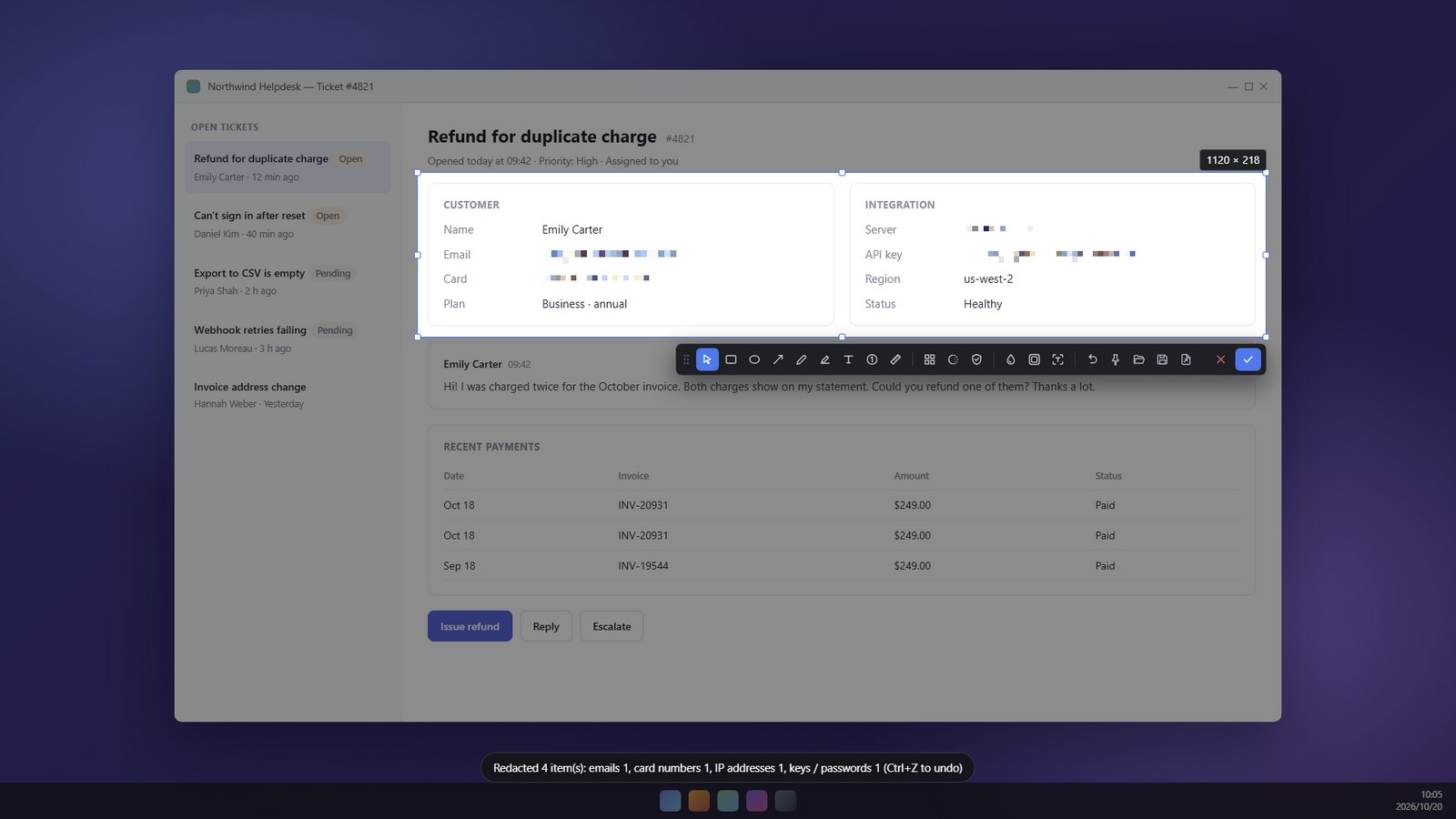
Option 2: One-click redaction (Pro, with a 7-day free trial)
The one-click redaction button in the toolbar reads the text in your selection with the OCR built into Windows, entirely on your PC, and then covers the sensitive values. It currently recognizes:
- Email addresses and IP addresses
- Bank card numbers (checked with the checksum digit so ordinary numbers are not covered by mistake)
- API keys and tokens from OpenAI, GitHub, AWS, Google, Slack and others
Only the value is covered and the label next to it stays, so the screenshot still makes sense. When it finishes, SnapDuck tells you how many spots were covered, and Ctrl+Z undoes it.
Always check the result
Text recognition is not perfect. Tiny fonts, busy backgrounds and tilted text can be missed. Look at the image once more before you send it, and fix any gaps with the mosaic or blur tools. If you need the original as a record, save it separately and share only the redacted copy.
Good to know
- Recognition happens on your PC. Your screenshot is not uploaded anywhere.
- The Pro trial needs no payment method and never charges automatically.
- Taking a very long page? See how to take a scrolling screenshot on Windows.
- More about the app on the SnapDuck home page.
SnapDuck is available from the Microsoft Store, and the core features are free.